> For the complete documentation index, see [llms.txt](https://docs.realtwin.org/llms.txt). Markdown versions of documentation pages are available by appending `.md` to page URLs; this page is available as [Markdown](https://docs.realtwin.org/cameratwin/troubleshooting/cannot-connect-camera-plan-limit-reached.md).
# Cannot connect camera: plan limit reached
When you attempt to connect a Camera Source, you may see the following Unreal Engine notification:
{% hint style="info" %}
You've reached your plan's limit for workstation sessions, check out your plan details and/or upgrade your plan
{% endhint %}
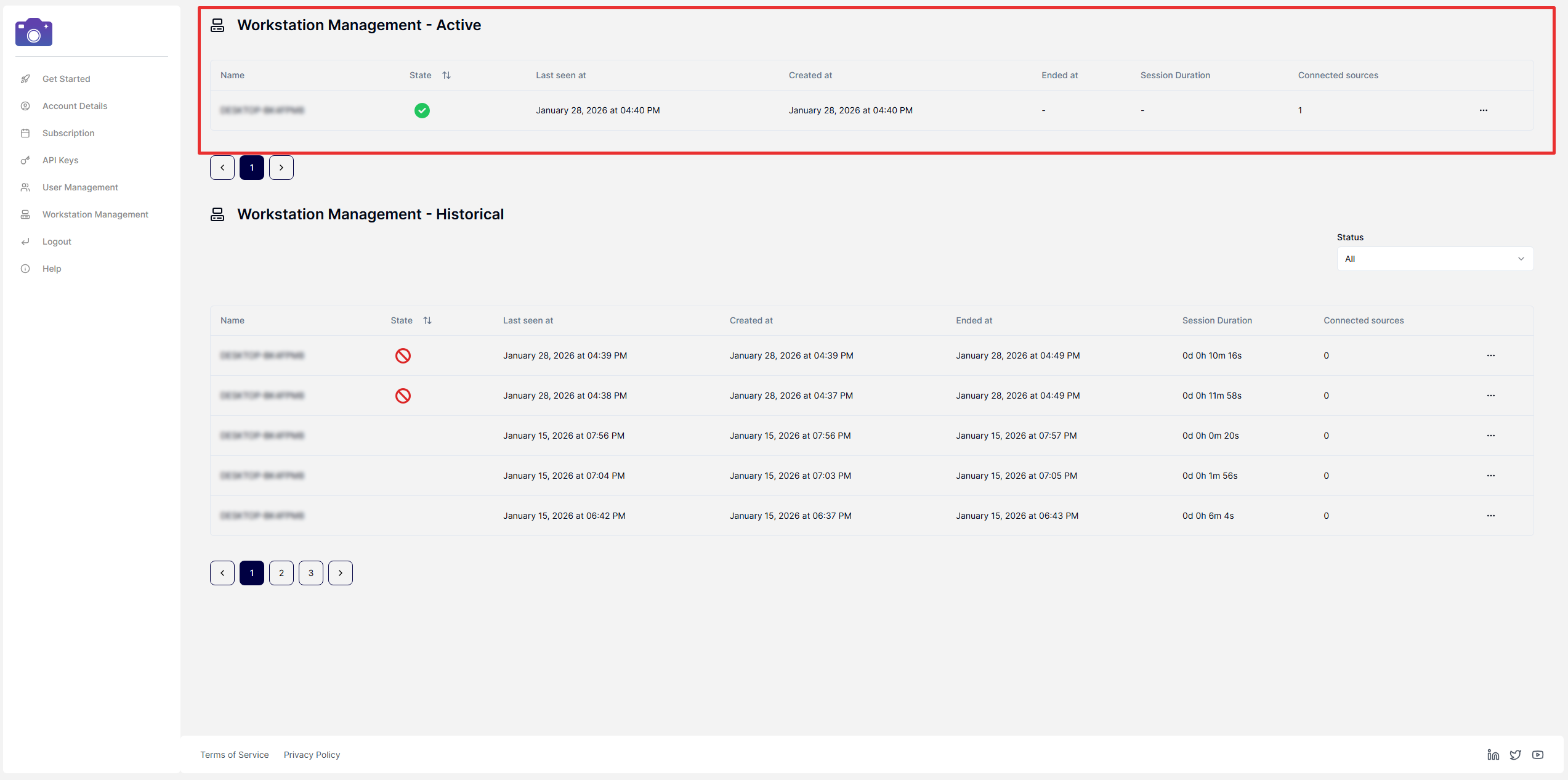
This usually means that one or more workstation sessions are still active on another machine, or that previous sessions were not properly stopped when the Unreal Engine Editor was closed (for example, the Editor crashed or was terminated from the Task Manager).
To resolve this:
1. Visit [Workstation Management](https://app.cameratwin.com/dashboard/workstation-management/).
2. Locate any sessions that are still listed as active.
3. From the Session Menu (three-dot menu), select Suspend Workstation for each active session you want to stop.
After suspending the lingering sessions, try connecting your Camera Source again.